
Google Analytics - 20 Ways to Fix Analytics. Please Hurry? | RyanSpoon.com

Google Analytics - 20 Ways to Fix Analytics. Please Hurry?

I’ve written a lot about web analytics and the importance of understanding and measuring your traffic. The resounding feedback I’ve gotten - and I wholeheartedly concur - is that Google Analytics remains the top used service but is far from satisfactory.

Google Analytics is a fascinating product. Google acquired Urchin in 2005 and it remains one of the great, most overlooked internet acquisitions. They reportedly paid $30 million for Urchin.

Now Analytics is installed on nearly every website, gives Google insight into traffic patterns and integrates with AdWords and AdSense… thus enabling Google to upsell products through optimization and unified accounts. Brilliant.

But it also is a classic example of a product that really hasn’t changed because Google doesn’t have a great incentive to do so. It’s a free product, adoption seems to growing (at least from what I can tell) and the revenue association is around data and AdWords upselling (not enhancing the product).

Here are 20 ways to fix Google Analytics - taken from my frustrations and those I’ve heard / received from other users:

1. Provide an API. This turns Analytics into a platform, enables developers and allows me to define what I want to see.

2. Make it Real Time. I don’t care if this comes at a cost or how precisely real-time it is… but it’s a necessity. Right now, the only way to use Analytics is the day after - and the internet is increasingly about the now.

3. Enable Off-.com Tracking. This is huge. I’d like to be able to measure my ‘network’ data like Quantcast does. I could embed that code across my network’s content, widgets, and so on.

4. Bring Back Hourly Charts. I want to see in-day trends and data. Is my peak time at 12 noon or 5pm? This is important stuff that simply isn’t available.

5. Enable Exporting of the Entire Dashboard. I spent lots of time setting up my dashboard. Export the whole thing in a excel doc with tabs…. not just the pageviews.

6. Enable Multi-User Access to the Dashboard. I spent an hour customizing my dashboard. Why does everyone else in my company need to spend an hour as well?

7. Charting Customization. Seems simple right? I’d like to configure what the charts look like. What the scales are. The list goes on. The default charts are so distorted that you simply can’t figure out trends.

8. Add Dates to the CSV Export. Why do I have to add dates EVERY time I export data?!

9. Data Comparison With Other Websites. I have dozens of websites on Analytics. I’d like to compare them on basic stats like pageviews, visits, bounce rates, etc.

10. Add Trendlines. Trendlines are useful… particularly when graphs of overly distorted. A perfect use case: when the charts are moved from daily to weekly, the current week’s data should show a trendline / forecast rather than simply die.
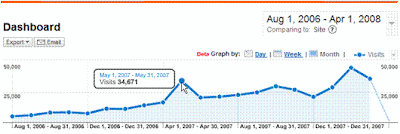
11. Add Day-Over-Day, Week-Over-Week, Month-Over-Month. When I hover over a data point, I should be able to compare it to the previous day, week or month. Maybe I can also customize which that is?

12. Associate Referrals, SEO with Content Pages. When I drill down to top content or directories, I’d like to know more than traffic numbers. Give me the top referrals to this page, SEO keywords, etc. Otherwise I have to spend 10 more clicks and wait a minute for each page load. Speaking of which:

13. Improve Site Speed. The site is getting slower by the week.

14. Improve the Dashboard. I’d like to name the 12 modules I have on my Dashboard. I’d like to also add links to my other regularly-used queries. Perhaps a light-iGoogle integration here?

15. Make it Social. Analytics is regularly used across companies. It would be terrific if the company could communicate on Analytics about trends, data, etc…. much like Google Docs. The comments can be RSS enabled and results can be emailed to the DL.

16. Email / Mobile Compatibility. I’d like scheduled reports that provide the basic information via email: pageviews, visits, etc (very different than current emailed exports). I’d like them via email so that I can access at scheduled times and on the go.

17. More Goals. More Goals. Goals are currently limited to three. More! If it’s costly, charge. People will pay.

18. Session Information. There isn’t much depth around user / session pathing. What are the most common exit pages? How does that change when users arrive through SEO? Registered vs. unregistered users?

19. Metric Comparisons. Analytics allows charting of very high level information, like page views vs. visits. I’d like to be able to chart any two data points on a two-axis graph and compare different metric sets. For instance, I’d like to chart page x, y, and z against each other using page views / visit and bounce rate. That currently is entirely manual - finding, charting, and exporting.

20. Make Data Public (On Opt-In Basis). This is larger than a feature enhancement and is more strategic: allow websites to make their data public as a medium to promote themselves, gain new users and understand where they rank within their vertical. To have your data shared, you’d be hooked into Google Analytics and a richer ecosystem would exist (with new revenue opportunities). This enables the start of some major ideas:

Think Google Hot Trends + Yahoo Buzz + Quantcast + Blogger.

[?]
Share This


You can follow any responses to this entry through the RSS 2.0 feed. You can leave a response, or trackback from your own site.

AddThis Social Bookmark Button

33 Responses to “Google Analytics - 20 Ways to Fix Analytics. Please Hurry?”

  1. […] barry@rustybrick.com (Barry Schwartz) wrote an interesting post today onHere’s a quick excerptNow Analytics is installed on nearly every website, gives Google insight into traffic patterns and integrates with AdWords and AdSense… thus enabling Google to upsell products through optimization and unified accounts. Brilliant. … […]

  2. re: #2

    While it’s not real-time you can choose today’s date in the reports to see how you were doing a few hours previously (it’s usually 2-3 hours behind.)

    #3

    What’s stopping you from embedding the code wherever you want right now? That’s what the domain report is for, isn’t it? Seeing what domains the traffic occurred on? Using JavaScript or server side code to create more useful page names would help with reporting (”example.com: home page” and “example2.com : home page” instead of several different versions of “/index.php” mashing into one report,) but other than that I can’t see what’s missing as-is (and if there is something I’m missing I’m always happy to learn, so lay it on me. Even if I’m just misunderstanding what you’re looking for)

    #4

    I really miss the hourly. both day-to-day and in analyzing big traffic events, the hourly reporting was great.

  3. the analytics data is in fact real time. I was confused at first as well. If you change the date on the top right you can select the current day.

    I think they have it that way so you don’t get confused about the stats being way off. so the default is only showing full day’s of stats.

  4. Excuse the brevity - posting via mobile. #2 is a problem because hourly reports (#4) don’t exist. So you have to guess how complete the data is. Guessing and analytics is a bad combo.

  5. Stefan,

    Today’s reports are not real-time. They update on the order of hours rather than minutes.

    I’ve been linked to on the front page of TechCrunch and it has taken as long as two hours for it to be reflected in Google Analytics.

  6. Personally I would live to see support for adding events to the analytics graphs - so that in the future we can look into the cause of the traffic spikes.

    Vineet

  7. You can have as many goals as you want per site, just create additional profiles. They are intended to be useful as high level filters, but you can use them to multiply your available goals.

  8. […] ProjectX staff have found this week. Atomisation of Conversations Added on 05/19/2008 at 10:40AM 20 ways to fix Google Analytics Added on 05/19/2008 at […]

  9. Clicky (click my name) already does about half of these. We don’t have a few of the more advanced features of GA like goals, but those will be coming soon.

    We have a very thorough API.

    We have real time data.

    Multi-user sites see the same dashboard.

    There is a simple comparison view of all your sites on your
    user home - today’s visitors and page views. We have had a number of requests to expand that and will be soon.

    Site is very fast.

    Our dashboard kicks GA’s ass, big time. You can’t custom name the individual modules but the amount of data you can have access to at a quick glance, with tons of Ajax love to go around, will make you happy I promise.

    We give details one very visitor to your web site, including a very friendly filtering interface to analyze visitors who come from a given domain, country, city, search query, use a certain browser or OS, etc. Including some more general filters too, like “all visitors who arrived via a link”. Example: http://getclicky.com/stats/visitors?site_id=10&source=links

    We released a new graphing interface recently that allows you to compare any two pieces of data, whether or not they seem related. e.g. # of visitors from social media sites vs total bounce rate (they are highly correlated!), or # of visitos from digg.com vs average action per visitor (big reverse correlation here). etc… it’s a lot of fun. Try it out in our demo.

    There is an option to make your data fully public and if you give someone a link to your dashboard they can view it instantly without having to login or anyhting like that.

  10. I had hourly data briefly back as part of a beta test.
    I hope they will bring it back, and make it real time at the same time.

    Dennis

  11. re: #1: We put together a GA API in Python here: http://www.juiceanalytics.com/openjuice/juiced-google-analytics-api/

  12. […] concur - is that Google Analytics remains the top used service but is far from satisfacthttp://ryanspoon.com/blog/2008/05/18/google-analytics-20-ways-to-fix-analytics-please-hurry/F-M BOE candidates speak CnylinkFour candidates are vying for three seats on the […]

  13. […] concur - is that Google Analytics remains the top used service but is far from satisfacthttp://ryanspoon.com/blog/2008/05/18/google-analytics-20-ways-to-fix-analytics-please-hurry/Dollar: Another Test of 1.60? Forex Capital Markets via Yahoo!7 FinanceFor most of the week the […]

  14. […] concur - is that Google Analytics remains the top used service but is far from satisfacthttp://ryanspoon.com/blog/2008/05/18/google-analytics-20-ways-to-fix-analytics-please-hurry/Eisai’s Commitment to Oncology Demonstrated by Clinical Data to be Presented at ASCO Annual Meeting […]

  15. […] un recente post di Ryan Spoon che scrive 20 consigli per migliorare Google Analytics, anche se la sua tesi è che Google non […]

  16. […] profundos, además de los cosméticos gracias a la compra de MeasureMap, Ryan hace una lista de 20 formas de arreglar GA que, sinceramente, harían que lo use en serio y no lo tenga instalado sin […]

  17. #2 Although it is not real time, 1-2 hours behind is not so bad.

    #3 You can track exclusively your network traffic with the help of filters.

    #4 Hourly charts are avaible in some reports since some months.

    #11 You can compare different times without no problems

    #12 With the segmentation you can do this

    #16 You can schedule to email the reports you want as you make with AdWords.

    #18 Again: segmentation

    #19 Possible since more than 2 months (Data comparission)

    GA needs a lot of improvements, but I think the users should take also more time to know the tools.

  18. […] Google Analytics és un producte que no ha canviat molt desde l’inici i Ryan Spoon proposa una llista de les característiques noves que s’haurien d’introduir perquè fos […]

  19. […] Google Analytics - 20 Ways to Fix Analytics. Please Hurry?, RyanSpoon […]

  20. […] Google Analytics - 20 Ways to Fix Analytics. Please Hurry?, RyanSpoon […]

  21. Hi Ryan,

    Great post. I was waiting for someone to start this discussion.

    #1. I agree with zach, although there isn’t an official API there are a lot of resources in the web to build a work around.

    #2. Real-time! I will settle for a known delay… right now (and I guess it has to do with how google collects and process data) you can’t really know if your data is stable even when checking last day numbers when you start your date at 9AM (or 10 AM) with a nice cup of coffee. Raise your hand if you haven’t seen traffic figures change for last day when checking at 9AM and then again in the afternoon.

    #3. I believe the the tracking code is quite flexible now and it allows you to track link sources and multiple domain/subdomains (network-like) sites. It’s true that installing the code to get quality data can be difficult. in this sense de documents in code.google.com is, in my opinion, a little bit more useful than GA site.

    #4 Hourly Charts are back and better than before!

    #5 Clicking export in the dashboard allow export to pdf and xml (I had only tried pdf) and email.

    #6 I agree that the 2 user levels allow little flexibility to configuration and reports access

    #7 Maybe you’re asking to much. Try exporting, google spreadsheets and then using graphs and gadgets

    #8 no comments

    #9 Google Analytics Benchmark is moving in that direction, unfortunately it doesn’t allow you to define to which sites you want to be compared (with every site permission, you could be able to set a closed benchmark among your own site or within a market niche which participants agree)

    #10 no comments

    #11 I agree with Alvaro, period comparison works quite well.

    #12 Check this script, it will allow you to do some of the things that you are asking http://www.roirevolution.com/blog/2008/05/segmenting_by_sourcemedium_and_other_stories.html

    #13, #14, #15, #16 no comments

    #17 I will definitely like more goals. Check #24.

    #18 I agree with you in this point. GA is quite confusing in current navigation reports switching between Page Views and visits in terms of what it’s reporting… Isn’t there another way to report more frequent paths?

    #19 no comments

    #20 If you build your own API, you can used to display your info as you wish… although if what you need is to diclose your data (from a thirdpaty) it would be nice to be able to configure a public dashboard which you could publish on your site or share by email.

    From other comments:

    #21 Thumbs up for Vineet Sinha suggestion, it would be great to import events from RSS (your IT change log, marketing campaigns management system, etc…) or enter them manually to the system to be able to relate changes in your traffic to this events… Kind of what google is doing with radioAds but on your own events.

    My thoughts:

    #22 I will like to be able to define a pageTracker object with an array of uaccts, in this way if I need to call the tag for two or more different account I don’t have to call consecutive pageTracker instances risking that some of them won’t be executed in the browser… if pageTracker is defined by an array of uaccts you either measure in all accounts/profiles or in none.

    #23 Extend or duplicate insite search tracking to be able to track insite banners. Right now GA fails to track insite banner effect in conversion.

    #24 In many cases you have a lot of goals (and funnels) that you would like to track separately. Imagine you have an ecommerce site with contents:

    content PVs Unique Views(visits)
    products/product.html?sku=123 453 389
    products/product.html?sku=56 45 39
    products/product.html?sku=11 789 756
    products/product.html?sku=345 123 111
    cart/addtocart.html?sku=123 151 149
    cart/addtocart.html?sku=56 21 21
    cart/addtocart.html?sku=345 310 309
    cart/buyproduct.html?sku=123 10 10
    cart/buyproduct.html?sku=56 1 1
    cart/buyproduct.html?sku=345 21 21

    addtocart could be and event, buyproduct could be and event or an ecommerce transaction.

    It will be great to be able to generate a product conversion table in which the first column is defined as ^products/product\.html\?sku=(123) and the next columns are defined as ^cart/addtocart\.html\?sku=$A1…

    Google Analytic will generate a conversion report for each item.

    #25 Store more campaigns in the cookie to track more exposures. I know there are some hacks for this but… is not the same.

    These are the entries entries in my wish list I remember

  22. Terrific dialog - really wow’d by @Alvaro and @L2RU.

    I love the idea of being able to tag dates or trends for future reference… a great way to remove noise from the data. This could be done either in a social manner using Google Docs (my fix #15) or via a more interactive interface.

    I agree with all of L2RU’s ideas… fascinating.

  23. […] Google Analytics - 20 Ways to Fix Analytics. Please Hurry?, RyanSpoon […]

  24. Great Post!

    Chris

  25. […] to gain a better understanding of past trends and possibly predict the future. Sure, there are some frustrations with current web analytics offerings, but as we continue to live in an increasing hyper-digital […]

  26. I also think they should provide for rolling samples. When samples are low, you can sometimes leverage trends by rolling together multiple data points. For example: (mon + tues), (tues + wed), (wed + thurs) etc. It softens the trend but at least you get some directional insight with validity…

  27. Can you please review Gadging.com, a free service to share and display Google Analytics data and compare between different websites. We originally created the service to be able to display top page view stats on our own blogs. However we felt that few others may be benefitted from it too.

    Looking forward to your feedback.

  28. This is an awesome list! Wow, someone feels my pain :)

    I have one to add…fix the help section and make it a bit more user friendly like…don’t include help results that point to Google Groups forums that have unresolved answers! Thanks, Google. Oh, and don’t automatically opt people in for things like data sharing for benchmarking.

    /rant

    Am I allowed to complain about a free product?

  29. Nice to play and easy to win but hard to fight.
    http://www.adnarticles.com

  30. I agree with almost all of these. I understand it would be taxing on GA’s servers to have absolute real-time stats, but in the world of the internet, a few hours is too much. As a diagnostic tool, it would be great to see when there are sudden spikes and drops in traffic as soon as they happen, so you can control the what and why. It’s also a pain to test new click tracking and have to wait hours for the result to show up in your reports, just to find out you made a typo or some other error.

    I would also like to see better user-defined variables. For instance, instead of just a variable name showing up in a report, how about a variable name AND a value? registration = registered OR unregistered, and then i can narrow down by variable name to see the results. Using this, you could also specify other variables from data you collect from users, so that you know which pages are popular for a certain demographic. This would, of course, require that you’re actually able to change the user defined variables once setting them… another current limitation of the product.

  31. Articles are always hard to search but here are some options.
    http://www.eshariq.com

  32. […] Websites I’d Pay For 7. Why I’d Rather be on Techmeme 8. Why I’m Uninstalling Disqus After 5 Days 9.Google Analytics: 20 Ways to Fix 10. Golden Gate […]

  33. Chill to mill and fill the drill of success with vigrx plus –
    http://www.vigrx-plus.net

Leave a Reply